
Providers & API keys
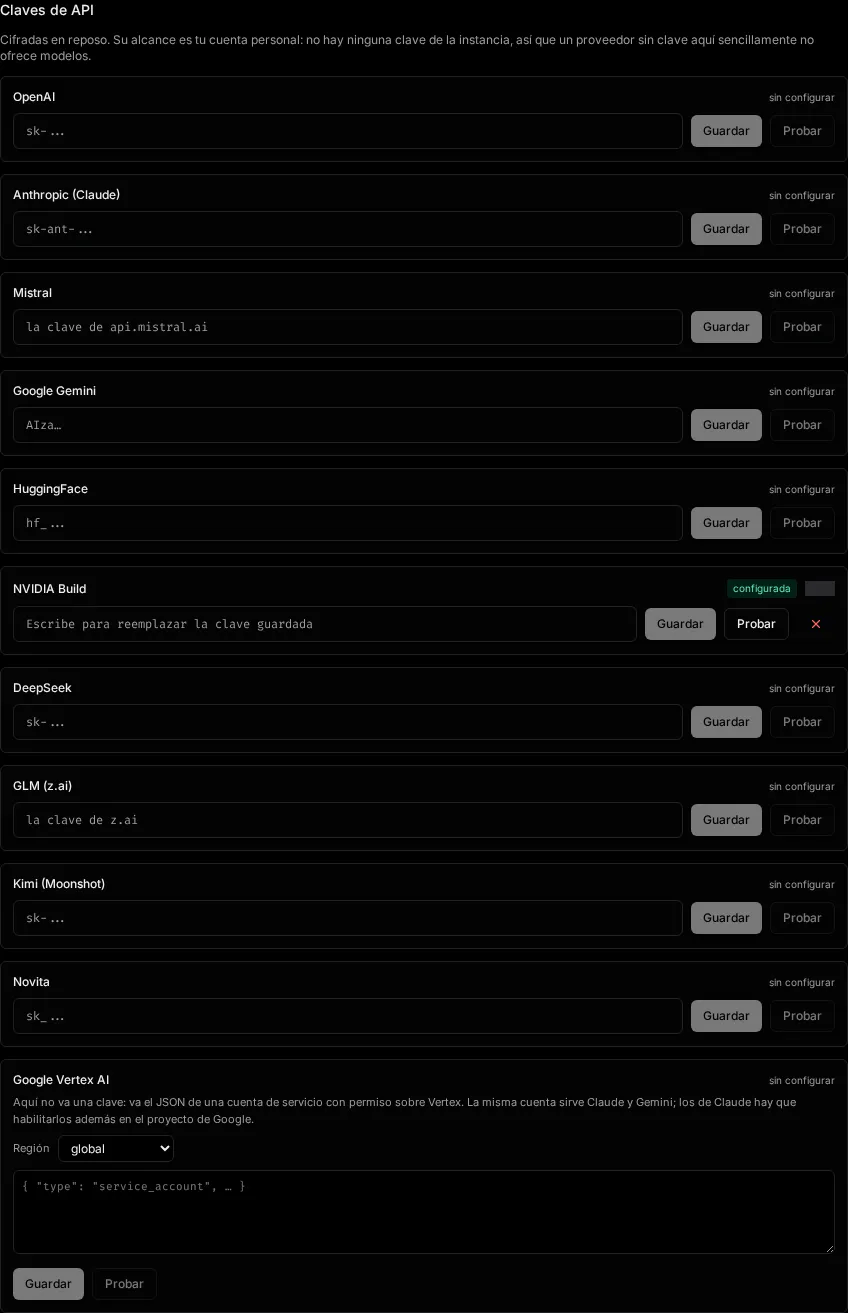
The Providers & API keys section of Settings is where you connect the LLM providers your
workspace uses. Add a provider key here and its models become selectable in chats and graph nodes.
Settings are scoped to the active workspace (personal or team) and managed by the
ProviderManager component.
Supported providers
Section titled “Supported providers”| Provider | What you provide |
|---|---|
| OpenAI | API key |
| Anthropic (Claude) | API key |
| Google Vertex AI (Claude and Gemini) | A service-account JSON, plus the region |
| Mistral | API key |
| Gemini | API key |
| HuggingFace | API key |
| NVIDIA Build | API key |
| DeepSeek | API key |
| GLM (z.ai) | API key |
| Kimi (Moonshot) | API key |
| Novita | API key |
Adding a provider key
Section titled “Adding a provider key”-
Open Settings and go to Providers & API keys.
-
In the Provider Manager, choose a provider and paste its API key.
-
Save. The provider’s models become available wherever you pick a model — in chats, the model picker, and Studio LLM nodes.
Related settings
Section titled “Related settings” Models & providers How models are selected and compared in chats.
Pricing Set per-model token costs so runs and trials report cost.