
Personal workspace
Created automatically when you first sign in. Only you can see its chats, agents, graphs, datasets, experiments, and labeling jobs.
Every resource in Chatty the Lab lives inside a workspace. A workspace is either personal (private to you) or a team (shared with other members). This dual scope keeps your private experiments separate from collaborative work while letting you move between the two with a single click.
Personal workspace
Created automatically when you first sign in. Only you can see its chats, agents, graphs, datasets, experiments, and labeling jobs.
Team workspace
Shared with other members. Everything created here is visible to the team according to each member’s role. Ideal for collaborative research.
A resource always belongs to exactly one workspace — never both. When you create something, it lands in whichever workspace is currently active.
The WorkspaceSwitcher lives in the navbar. It lists your personal workspace and every team you belong to. Selecting one makes it the active workspace and immediately re-scopes the whole app: the Chats sidebar, the Studio’s agent catalog, your datasets and experiments, and scope-bound settings all update to show only what belongs to that workspace.
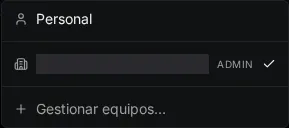
Open the WorkspaceSwitcher and choose to create a new team.
Give the team a name. You become its first member with the admin role.
Switch into the new team via the WorkspaceSwitcher — anything you create now is owned by the team.
Teams have two roles:
| Role | Can do |
|---|---|
| Admin | Everything a member can, plus manage members: invite people, change roles, and remove members. |
| Member | Create and use resources within the team workspace. |
As an admin, open the team’s member management.
Enter the email address of the person you want to invite and send the invitation. They receive a magic-link email containing an invite token.
The invitee opens the link, which lands on /invite/[token], and accepts. They are added to the
team and can now switch into it from their own WorkspaceSwitcher.
Switching workspaces re-scopes data across pillars: